
How to Use Typing Test Results to Improve
Transform raw WPM, accuracy, and consistency metrics from vanity numbers into a diagnostic feedback loop.
Diagnostic rule
A typing test is a thermometer, not medicine. It tells you your current temperature, but it does not heal the illness. If you take 30 tests in a row without diagnosing and drilling your mistakes, you are simply rehearsing your existing flaws.
The Test-Farming Trap
Every day, thousands of typists open a speed test, type for 60 seconds, score 58 WPM, grimace at the result, and immediately hit "Restart." They do this 25 times until they hit a lucky test with easy words, score 67 WPM, smile, and close their browser.
This common habit is known as test-farming. It treats typing tests as a slot machine, hoping for favorable random word sequences.
The problem with test-farming is that testing only measures what you can already do. It places your nervous system under evaluative stress, which causes you to tense up and lean heavily on existing motor habits—including your worst ones. To actually increase your speed, you must convert testing into a diagnostic feedback mechanism.
The 4-Step Diagnostic Action Loop
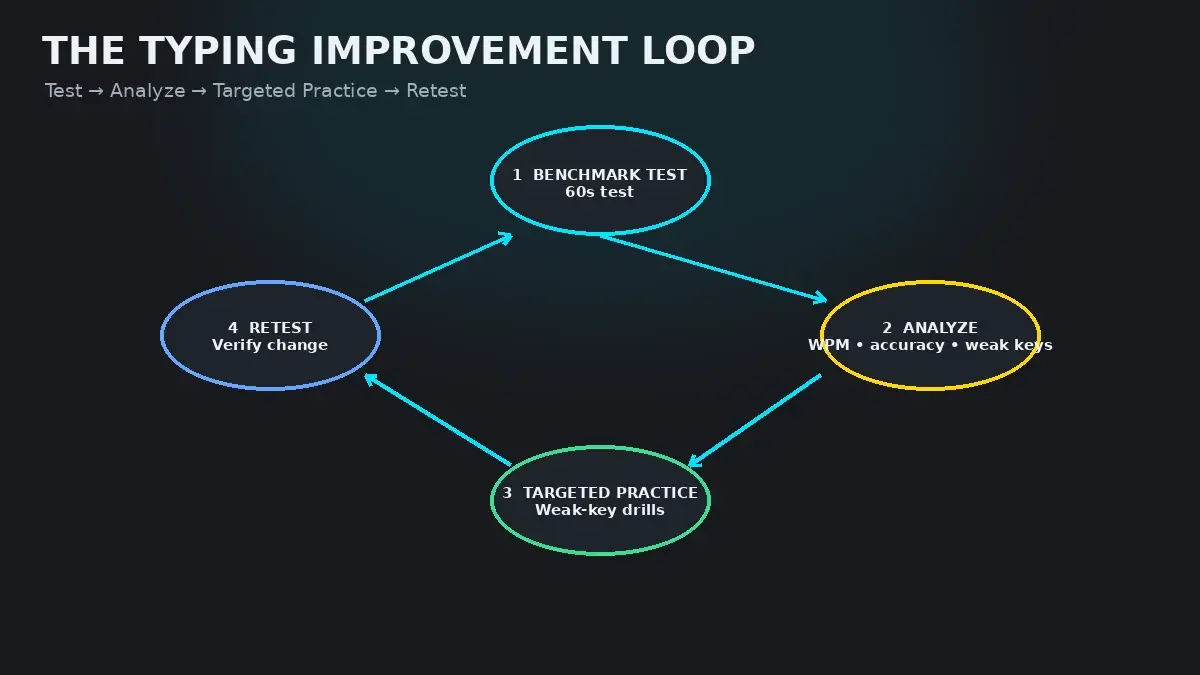
High-performance typists use a repeatable four-step loop that turns every test result into tangible skill gains:
- Step 1: The Diagnostic Test (2 minutes): Take a single, controlled 60- or 120-second test on the HeroTyping Speed Test. Do not restart halfway through if you make a mistake; finish the run so the error is captured in your data log.
- Step 2: Error Pattern Isolation (1 minute): Look at the summary screen. Which specific words contained red letters? Did your consistency drop during a specific paragraph? What was the spread between your Raw WPM and Net WPM?
- Step 3: Targeted Remediation (10 minutes): Close the test screen. If you stumbled on reaches like
BandP, launch the HeroTyping Weak-Key Practice drill to re-anchor those specific trajectories. - Step 4: The Validation Retest (2 minutes): Return to the test. Verify whether your accuracy stabilized and whether the hesitation on your diagnosed bottleneck letters disappeared.
Interpreting Test Metric Patterns
Your post-test dashboard contains four primary numbers: Net WPM, Raw WPM, Accuracy %, and Consistency %. The relationship between these numbers reveals your exact physiological bottleneck:
| Diagnostic Metric Pattern | Underlying Root Cause | Immediate Corrective Action Plan |
|---|---|---|
| High Raw WPM, Low Net WPM (Accuracy < 92%) | Premature speed rushing. You are moving your hands faster than your brain can plan motor trajectories. | Impose an artificial speed governor: slow down by 15 WPM until your accuracy holds 97%+ for 5 tests. |
| High Accuracy (99%+), Low WPM (< 40 WPM) | Excessive caution and over-verification. You are waiting to see each letter appear on screen before typing the next. | Look-ahead drill: read 2 to 3 words ahead of the cursor. Force your fingers to flow without waiting for visual confirmation. |
| High WPM, Low Consistency (< 60%) | Burst-and-stall typing. You sprint through easy words (the, and) but hit brick walls on complex syllables or punctuation. | Metronome practice: type to a steady 120–140 BPM beat. Smooth out velocity peaks to eliminate dead pauses. |
| Errors Clustered in the Last 30 Seconds | Cognitive or physical stamina fatigue. Your forearm extensor tendons or working memory are fatiguing under sustained load. | Endurance intervals: switch from 60s tests to 2-minute and 5-minute endurance runs. Check desk and wrist ergonomics. |
Reading Your Error Breakdowns
Beyond raw numbers, examine the qualitative nature of your mistakes:
- Adjacent Key Slips: Typing
Ninstead ofMorEinstead ofRindicates that your finger angle is slightly off. Check whether your wrists are drifting outward (elbow flare). - Late Backspaces: If you typed three characters past an error before noticing it, your visual feedback loop is delayed. Slow down your keystrokes to match your visual verification speed.
- Punctuation Stumbles: If your speed drops by 20 WPM whenever quotes or commas appear, schedule two sessions on our Punctuation Typing Practice guide.
Taking Action in HeroTyping
Now that you know how to read your data, put the loop into practice today:
- Take a baseline test on the HeroTyping Speed Test.
- If accuracy is under 95%, review Why WPM Is High but Accuracy Is Low.
- If consistency is under 70%, read How to Improve Typing Consistency.
- If specific letters failed, jump straight into Weak-Key Remediation Drills.
FAQ
How often should I take a typing test if I want to improve?
Take a formal diagnostic typing test only once or twice per practice session. The optimal ratio is 80% deliberate practice (drilling weak keys, lessons, and rhythm) and 20% evaluative testing. Taking 20 tests in a row tests your skill, but does not train new motor pathways.
What is the difference between Net WPM and Raw WPM on HeroTyping?
Raw WPM (Gross WPM) measures total keystroke velocity, regardless of errors. Net WPM subtracts uncorrected errors, measuring true usable typing output. If your Raw WPM is 80 but your Net WPM is 55, you are losing 25 WPM of productive work to mistakes and backspacing. Read our guide on Net WPM vs Gross WPM for exact formulas.
What does the Consistency percentage on the result screen mean?
Consistency measures how evenly spaced your keystrokes were throughout the test. A consistency score of 85%+ means you maintained a uniform, metronomic cadence. A consistency score below 65% indicates a 'burst-and-stall' pattern where you sprinted through some words and ground to a complete halt on others.
Why does my typing test score fluctuate by 15 WPM between attempts?
WPM fluctuations are driven by three factors: word difficulty variance (rare consonants vs common words), fatigue level, and emotional frustration. If you make an early error and panic, your subsequent rhythm collapses. Look at your 7-day rolling average rather than individual test peaks.
Sources & references
- Feedback and Knowledge of Results in Perceptual-Motor Skill Learning — Salmoni, A. W., Schmidt, R. A., & Walter, C. B. (Psychological Bulletin, 1984)
- Deliberate Practice and the Modifiability of Cognitive and Motor Performance — Ericsson, K. A. (Medical Education, 2004)
- Keystroke Timing Variability and Skill Progression in Typists — Gentner, D. R. (Cognitive Science, 1983)