
How to Find Your Weakest Typing Keys
Stop guessing why your typing stumbles. Here is how to diagnose specific problem keys with error logs and statistical thresholds.
Diagnostic rule
Never classify a key as weak based on an isolated mistake. A genuine weak key shows a repeatable accuracy rate under 90% across at least 6 to 10 verified attempts within natural words. Fixing two diagnosed weak keys routinely yields a bigger WPM leap than 50 random typing tests.
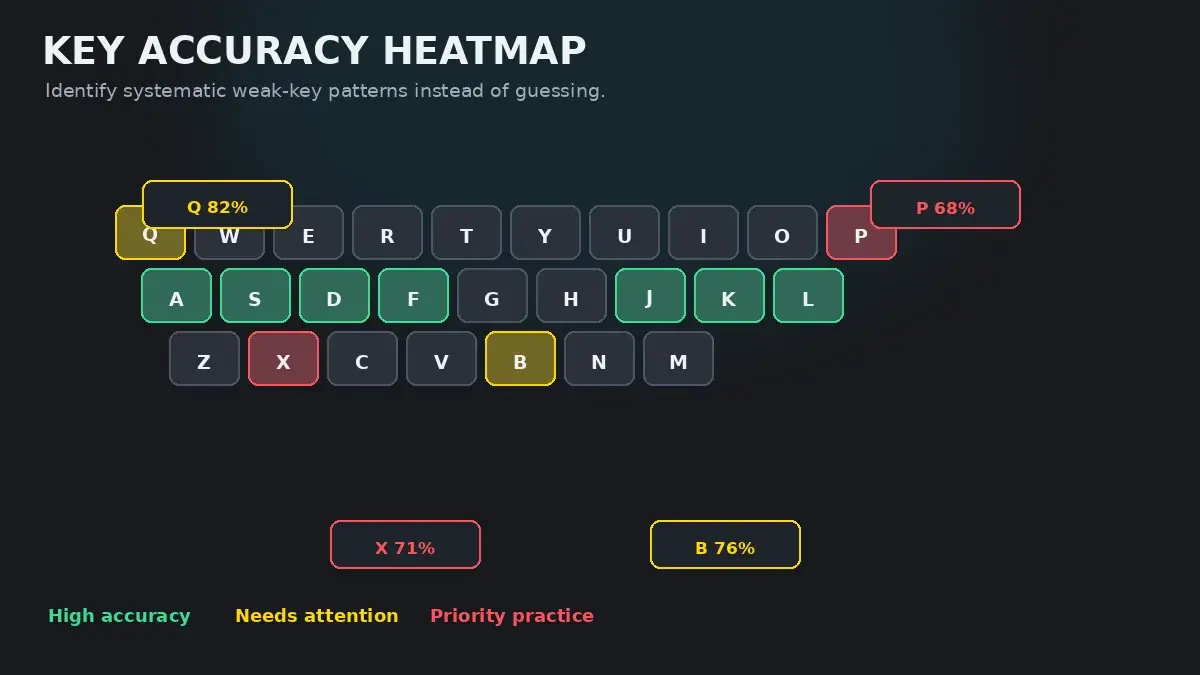
Why Diagnosis Beats Blind Practice
Most typists who hit a speed plateau react by typing more tests. When they stumble on a test, they blame general fatigue, nerve tension, or bad luck. But typing breakdowns are rarely general; they are almost always localized to two or three specific keys whose neural pathways are slower or less consistent than the rest of your fingers.
Consider what happens during a 60 WPM test. You type roughly five characters every second. When your fingers hit a fluent sequence like the, and, or ing, you move in a smooth ballistic rhythm. But when your hand approaches a key with uncertain spatial memory—such as the letter B, P, or a punctuation mark like ;—your brain pauses for 150 to 300 milliseconds to confirm the finger coordinate.
That micro-pause shatters your cadence, ruins your typing consistency, and frequently produces an adjacent-key misstrike. Finding those specific bottleneck keys is the single highest-leverage intervention in keyboard training.
The Statistical Threshold: Sample Size Matters
A common mistake when analyzing typing statistics is over-indexing on rare letters. If you take a short test and type the letter Z once, but accidentally strike X, your error report will show Z at a dismal 0% accuracy.
Does this mean Z is your primary bottleneck? Almost certainly not. In standard English prose,Z accounts for less than 0.1% of all letters. Spending 20 minutes drilling Z while ignoring an 88% accuracy rate on O (which accounts for over 7% of English characters) will produce zero noticeable improvement on your everyday typing speed.
To separate true motor weaknesses from random statistical noise, apply these three criteria:
- Minimum attempt threshold: Only evaluate keys with at least 6 recorded attempts during a practice session.
- Accuracy threshold: A key is classified as an active weak key when its accuracy drops consistently below 90% across multiple runs.
- Lexical frequency weight: Prioritize fixing vowels and high-frequency consonants (
E, T, A, O, I, N, S, R) before troubleshooting low-frequency fringe keys.
The Four Major Error Patterns
When you miss a key, the exact nature of the mistype tells you why the mistake happened. Review the table below to categorize your diagnostic patterns:
| Pattern Category | Typical Example | Biomechanical Root Cause | Diagnostic Drill |
|---|---|---|---|
| Adjacent Slip | Pressing 'E' instead of 'R', or 'K' instead of 'L' | Finger reach angle drift or resting too close to key borders. | Type isolated bigrams at 50% speed. If errors vanish, it is a pacing issue, not finger confusion. |
| Symmetrical Hand Mirroring | Pressing 'D' (left middle) when aiming for 'K' (right middle) | Cognitive cross-talk between cerebral hemispheres during speed surges. | Slow down by 15 WPM. If mirroring stops, your motor planning is outpacing your visual buffer. |
| Pinky Weakness / Underextension | Missing 'P', 'Q', 'Z', or ';', or hitting the key edge weakly | Extensor digiti minimi muscle fatigue and insufficient anchor stability. | Check wrist angle. Floating wrists or excessive elbow flare usually starves pinky reach. |
| Shift Key Timing Misalignment | Typing 'tHe' or missing capitalization completely | Releasing the opposite Shift key before depressing the target letter. | Examine capitalized sentence runs. If errors cluster on capital letters, it is dual-hand coordination. |
Analyzing Your Error Logs Step by Step
To diagnose your weak keys systematically, follow this 4-step diagnostic protocol:
- Take a controlled 2-minute baseline test: Open the standard HeroTyping Speed Test and select a 60-second or 120-second duration. Do not sprint at your maximum chaotic speed; type at a comfortable, natural pace.
- Examine the post-test error breakdown: Check which characters registered red strikes. Note whether the errors were misses, late backspaces, or extra insertions.
- Check the HeroTyping Key Performance Tracker: If you use HeroTyping Lessons, the internal performance engine automatically aggregates your per-key statistics across exercises. If a key falls below 90% accuracy with 6+ attempts, the platform flags it in your dashboard as a priority weak key.
- Inspect adjacent anchor stability: When you miss a key like
U, check whether your right index finger drifted off its home anchor bump onJ. An unstable anchor almost always corrupts the reaches above and below it.
From Diagnosis to Targeted Practice
Once you have identified your 2 or 3 weakest keys, do not continue taking generic speed tests. Generic tests dilute your practice time across 26 letters, giving your problem keys only occasional exposure.
Instead, switch immediately to targeted remediation. Read our comprehensive guide on Typing Practice for Weak Keys to learn the bigram embedding method, or jump directly into the adaptive HeroTyping Weak-Key Practice Drill to generate custom practice text built specifically around your diagnosed problem letters.
FAQ
How many typing attempts do I need before a key is statistically 'weak'?
A key needs at least 6 to 10 recorded attempts in real words before accuracy numbers become meaningful. Missing a key once out of two attempts gives an apparent 50% error rate, but that single slip is statistical noise. HeroTyping's engine requires at least 6 recorded attempts and an accuracy below 90% before classifying any key as an active weak key.
Why do I keep mistyping common letters like 'E' and 'T'?
High-frequency letters like 'E', 'T', and 'A' appear in hundreds of different word contexts and consonant blends. You make more gross errors on them simply because you type them ten times more often than 'Z' or 'X'. To evaluate whether 'E' is truly weak, calculate your percentage error rate rather than raw error count.
Can keyboard hardware cause false weak keys?
Yes. Key chatter (switch contact bouncing causing duplicate letters) or stiff, off-axis friction on mechanical switches can register artificial errors. If you suspect hardware, test the suspect key in a plain text editor with slow, repeated strikes. If duplicates or missed activations occur without rapid typing, the physical switch or stabilizer may need cleaning or replacement.
Should I diagnose weak keys on 15-second bursts or 2-minute tests?
Use 1-minute to 2-minute typing tests or full paragraphs for diagnosis. 15-second sprints measure adrenaline and warm-up bursts; they don't give enough keystroke volume across the full alphabet to uncover underlying biomechanical friction or fatigue patterns.
Sources & references
- Motor Skill Learning and Keystroke Dynamics in Touch Typing — Logan, G. D., & Crump, M. J. (Cognitive Psychology, 2011)
- Error Detection and Correction Mechanisms in Skilled Typists — Rabbitt, P. (Journal of Experimental Psychology, 1978)
- Biomechanical Analysis of Finger Trajectories on Standard QWERTY Layouts — Rempel, D., et al. (Human Factors and Ergonomics Society, 2007)