
A Complete Touch-Typing Roadmap for Beginners
A realistic, milestone-driven progression path from hunting-and-pecking to fluent 60+ WPM touch typing.
Realistic timeline
Ignore claims that you can reach 100 WPM in one week. Genuine touch typing requires roughly 15 to 20 hours of distributed practice across 6 to 8 weeks to achieve effortless 40 to 50 WPM fluency without looking at the keyboard. Consistency beats binge practice every time.
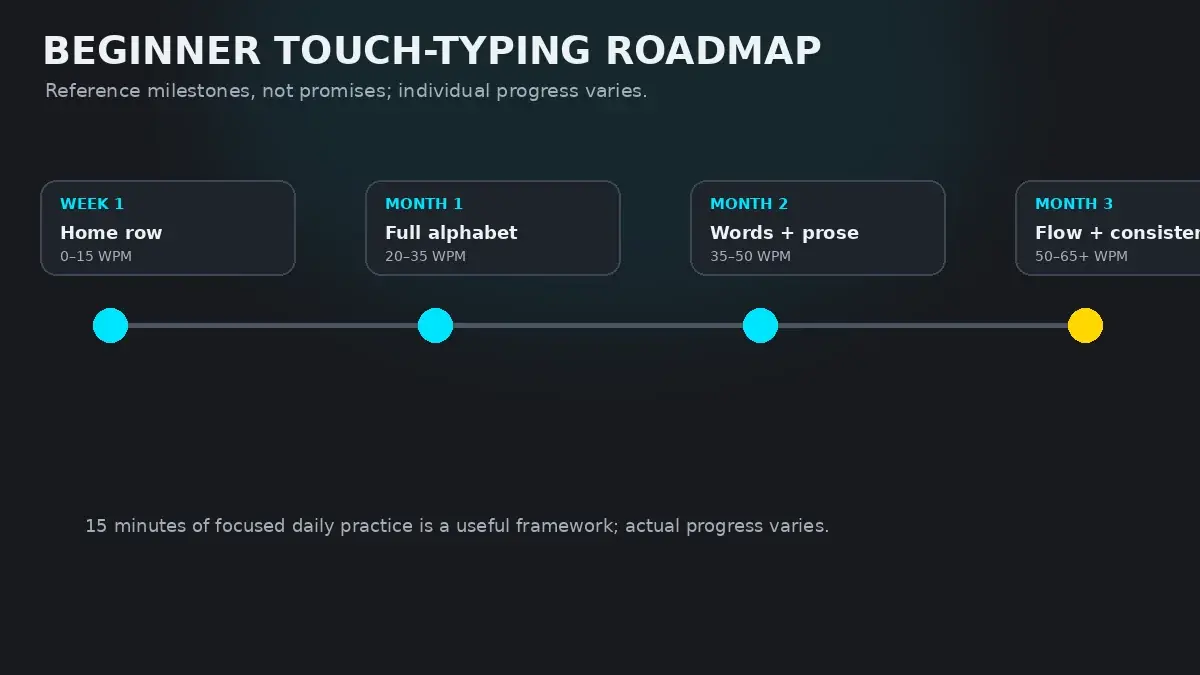
The Four Cognitive Stages of Touch Typing
In motor learning psychology, the landmark Fitts & Posner model describes how complex physical skills transition from clumsy intellectual effort into unconscious automaticity. When learning to touch type, you will journey through four distinct stages:
- 1. The Cognitive Stage (Week 1–2): Every keypress is a deliberate intellectual decision. You consciously remind yourself: "The letter R is typed by extending the left index finger upward and left from the F key." Typing feels slow, mechanical, and mentally exhausting.
- 2. The Associative Stage (Week 3–6): Gross errors decline sharply. You no longer think about individual finger movements; instead, you begin grouping letters into small clusters (like th, er, or in). Your hands start anticipating the next keystroke before the previous one finishes.
- 3. The Autonomous Stage (Week 7–12): Typing becomes completely automated. You look at a word on screen, and your hands execute the full sequence without conscious intervention. Your mental energy is freed to focus on the content and meaning of your writing rather than the keyboard mechanics.
- 4. The Flow Stage (Month 4+): You enter rhythmic flow states where keyboard interaction disappears entirely. Your fingers glide effortlessly at 60 to 80+ WPM with 98%+ accuracy across extended writing, coding, or communication sessions.
The Month-by-Month Progression Roadmap
To maintain steady momentum and track whether your progress is on schedule, measure your performance against these monthly milestones:
| Timeline Stage | Core Training Focus | Target Speed & Accuracy | Qualitative Milestone |
|---|---|---|---|
| Month 1: The Mechanical Foundation | Anchoring, tactile finger placement, zero looking down, and learning all 26 alphabetic keys. | 20–25 WPM at 95%+ Accuracy | Can type any everyday word slowly without ever glancing at your hands. |
| Month 2: Sub-Word Chunking | Common bigrams and trigrams (th, ing, ion, ed), basic punctuation, and consistent cadence. | 35–45 WPM at 96%+ Accuracy | Typing speed catches up to your old hunt-and-peck speed, but with zero cognitive fatigue. |
| Month 3: Full Fluency & Numbers | Number row integration, capitals with dual Shift keys, code syntax, and longer paragraphs. | 50–60 WPM at 97%+ Accuracy | Touch typing feels completely natural; you can type thoughts directly as you think them. |
| Month 4+: Mastery & Speed Endurance | High-speed flow, vocabulary expansion, stamina under 2- to 5-minute sustained typing runs. | 65–80+ WPM at 98%+ Accuracy | Typing exceeds average human speech speed; keyboard is an invisible extension of your mind. |
Surviving the Initial Speed Dip
The number one reason beginners give up on touch typing is the "Learning Dip."
Before starting touch typing, many people have spent years typing with an informal two- or four-finger "hunt-and-peck" style. They can often peck out emails at 30 to 40 WPM.
When you force yourself to keep all ten fingers on the home row and never look down, your speed will immediately plummet to 15 WPM on Day 2. You will feel clumsy. You will feel an intense urge to look down at your keyboard just to finish an email quickly.
You must resist this urge. The speed dip lasts only 10 to 14 days. If you revert to hunting and pecking during work hours, your brain never consolidates the new touch-typing pathways. Give yourself permission to type slowly for two weeks; the lifetime payoff of 70+ WPM typing is well worth the temporary patience.
Essential Ergonomics Setup
Good technique depends on a stable physical foundation. Before logging your practice sessions, verify your physical workspace:
- Elbows at 90–100 degrees: Your desk or chair height should allow your forearms to rest parallel to the floor or slope slightly downward toward the keyboard.
- Wrists floating, not planted: Never rest your wrists or palms flat against a hard desk while typing. Planting your wrists anchors your hands, forcing your fingers to stretch past their natural range of motion and compressing the carpal tunnel. See our comprehensive guide on Proper Typing Posture and Ergonomics.
- Display at eye level: Keep your monitor directly in front of you so your neck remains neutral. If your screen is too low, you will naturally look downward, which unconsciously invites your eyes to peek at your keyboard.
How to Begin Today in HeroTyping
Building a lifelong touch-typing habit is simple when you follow a structured system rather than random drills:
- Start with the structured curriculum: Explore the Touch Typing Lesson Order or dive directly into HeroTyping Lessons.
- Commit to 15 minutes of practice every day. Check your Today's Training recommendation on your lesson dashboard.
- Once a week, take a standard 1-minute test on the Speed Test to log your WPM benchmark and track your upward trendline over the months.
FAQ
How long does it take an absolute beginner to learn to touch type?
Most adults learn the full keyboard without looking within 15 to 20 total hours of deliberate practice. Spread across 15 minutes a day, that translates to approximately 6 to 8 weeks to reach comfortable, confident 40 WPM touch typing.
Will I get slower before I get faster?
Yes, absolutely. If you currently hunt-and-peck with two to four fingers at 35 WPM, switching to strict 10-finger touch typing will initially drop your speed to 12–18 WPM during week one. This temporary dip is completely normal: you are replacing an inefficient visual habit with an unconscious neuromuscular map.
Is it possible to learn touch typing if I am an adult who has typed with bad habits for 10 years?
Yes. Adult neuroplasticity is more than capable of motor remapping. What adults struggle with is not brain adaptability, but the emotional frustration of typing slower during the initial two-week transition. Commit to strict technique for 14 days, and old habits will rapidly extinguish.
What should I do if I keep looking down at the keyboard?
Place a light cloth or paper towel over your hands while practicing, or tilt your monitor slightly upward so your peripheral vision cannot catch your fingers. Focus your eyes entirely on the text on the screen. Whenever you feel lost, find the tactile bumps on 'F' and 'J' by feel alone rather than looking.
Sources & references
- Stages of Learning and the Acquisition of Complex Perceptual Motor Skills — Fitts, P. M., & Posner, M. I. (Human Performance, Brooks/Cole, 1967)
- The Time Course of Perceptual and Motor Skill Learning — Newell, K. M., & Rosenbloom, P. S. (Cognitive Skills and Their Acquisition, 1981)
- Neuroplasticity and Skill Learning in the Adult Human Motor Cortex — Sanes, J. N., & Donoghue, J. P. (Annual Review of Neuroscience, 2000)