
Touch Typing Lesson Order
The optimal curriculum sequence for learning to touch type without cognitive overload or bad habits.
Curriculum principle
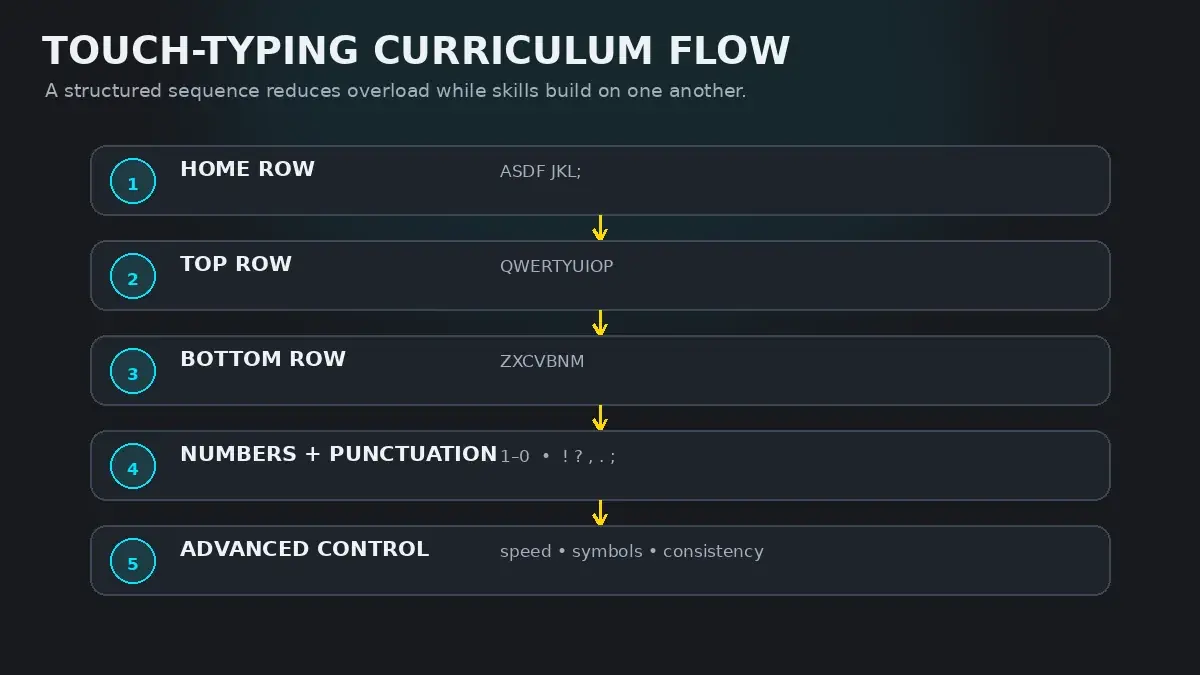
Never attempt to learn the entire keyboard simultaneously. Motor skill acquisition requires sequential chunking: master the home-row anchors first, expand upward to high-frequency top vowels, master downward curls, and only then introduce the cognitive demand of numbers and Shift symbols.
The Science of Curriculum Sequencing
Learning to touch type is not merely memorizing where 26 letters live on a piece of plastic. It is the construction of an unconscious sensorimotor map inside your brain's motor cortex.
When beginners try to learn by typing general paragraphs immediately, their working memory is flooded. They must decide which hand to use, which finger to extend, how far to reach, and whether to hold Shift—all while trying to read text on a screen. Under this cognitive overload, the brain instinctively reverts to what feels easiest: looking down at the keyboard and hunting with two index fingers.
A well-designed typing curriculum prevents this regression by strictly limiting new variables. You master one row at a time, anchoring new finger reaches onto previously solidified tactile coordinates.
The Five Progressive Curriculum Phases
Every competent typist follows an identifiable progression from physical anchoring to unconscious flow. Here is how the standard curriculum is broken down:
| Curriculum Phase | Keys Covered | Core Biomechanical Goal | HeroTyping Curriculum |
|---|---|---|---|
| Phase 1: Home Row Foundation | A, S, D, F, J, K, L, ; | Establish tactile indexing on F and J bumps. Eliminate looking down at the keyboard. | Lessons 1–4 (Home Row Left, Right, Combined, Words) |
| Phase 2: Top Row Expansion | Q, W, E, R, T, Y, U, I, O, P | Learn upward diagonal reaches while preserving home-row anchor contact. | Lessons 5–8 (Top Row Left, Right, Combined, Words) |
| Phase 3: Bottom Row & Full Alphabet | Z, X, C, V, B, N, M | Master downward finger curling without planting wrists on the desk surface. | Lessons 9–12 & Beginner Checkpoint (Lesson 17) |
| Phase 4: Numeric Row & Common Punctuation | 1–0, Period, Comma, Apostrophe, Question Mark | Extend spatial map to two-row reaches and coordinate opposite-hand Shift keystrokes. | Lessons 13–16 (Numbers, Punctuation) |
| Phase 5: Speed, Endurance & Code Mastery | All alphanumeric + shift symbols (!@#$%^&*()_+) and syntax | Sub-word chunking, rapid word flow, and fatigue resistance during long sessions. | Lessons 18–28 (Speed, Endurance, Checkpoints, Final Challenge) |
Why Alternative Orders Fail
Learners frequently ask whether they can start with the top row because "QWERTY starts at the top," or whether they should learn all vowels first. Educational research consistently shows these alternative approaches fail for two distinct biomechanical reasons:
- Loss of Tactile Homing: Only two keys on the standard keyboard have raised tactile bumps:
FandJ. Both live on the home row. If you start with any other row, your hands have zero tactile feedback to re-center themselves after striking a key, forcing you to look down. - Cortical Representation: In human neuroanatomy, your index and middle fingers have far larger motor representations in the brain than your ring and pinky fingers. Starting with index-finger anchors (
FandJ) builds immediate success, whereas starting with pinky reaches (Q,P,Z) triggers early hand fatigue and frustration.
When to Advance: The 95% Accuracy Gate
The single most common mistake in learning to type is rushing ahead to new lessons before your previous keys are automated.
Use this simple rule: Do not advance to a new lesson until you pass the current one with at least 95% accuracy across three consecutive runs.
If your accuracy on the home row is 88%, advancing to the top row does not teach you the top row—it merely compounds your home-row uncertainty. Speed is completely irrelevant during the first three phases. A learner who types at 18 WPM with 99% accuracy will surpass a learner who types at 35 WPM with 85% accuracy within three weeks.
The HeroTyping 28-Lesson Structured Path
To make this curriculum effortless to follow, HeroTyping organizes keyboard learning into a cohesive, 28-lesson progression structured across three natural skill tiers:
- Beginner Tier (Lessons 1–17): Covers the Home Row (1–4), Top Row (5–8), Bottom Row (9–12), Numbers Low/High (13–14), Full Keyboard Words (15), Punctuation (16), and the culminating Beginner Checkpoint (Lesson 17).
- Intermediate Tier (Lessons 18–23): Focuses on everyday sentences, rhythm building, mixed alphanumeric practice, longer paragraphs, and the Intermediate Checkpoint (Lesson 23).
- Advanced Tier (Lessons 24–28): Challenges your speed endurance, high-pressure precision, long-form typing, advanced numbers and symbols mastery, and the Final Graduation Challenge (Lesson 28).
Ready to begin? Visit the complete HeroTyping Lessons Dashboard to start with Lesson 1, or take the skill placement test to jump in at your current competency level.
FAQ
Why should I learn the home row before anything else?
The home row is your keyboard anchor. The tactile bumps on 'F' and 'J' give your hands a fixed physical reference point in space. Without an established home-row resting position, your hands float across the keyboard, forcing your eyes to constantly look down to locate each key.
Should I learn letters and numbers at the same time?
No. Introducing numbers too early creates severe cognitive overload. The number row is two full rows above the home row and requires long reaches. You must automate the 26 alphabetic keys until blind typing is effortless before introducing numbers and Shift symbols.
Why does the top row usually come before the bottom row?
Bioméchanically, extending fingers upward into the top row is more natural for human hand anatomy than curling fingers tightly backward into the palm for the bottom row. Furthermore, top-row vowels ('E', 'I', 'O', 'U') and consonants ('T', 'R') account for over 45% of English letters, allowing beginners to construct real words immediately.
How long should I stay on each curriculum phase?
Do not advance to the next row until you achieve at least 95% accuracy on your current row's exercises. Speed does not matter initially—whether you type at 15 WPM or 35 WPM, flawless accuracy and zero glances at the keyboard are the true criteria for advancing.
Sources & references
- Cognitive Load Theory and the Acquisition of Complex Perceptual-Motor Skills — Sweller, J., van Merriënboer, J. J., & Paas, F. (Educational Psychology Review, 1998)
- Cortical Representation of Hand and Finger Movements in Skilled Typists — Karni, A., et al. (Nature, 1995)
- Curriculum Design in Psychomotor Education: A Taxonomic Approach — Singer, R. N. (Journal of Physical Education, Recreation & Dance, 1980)