
One-Handed Typing Guide: Left & Right-Handed Layouts & Techniques
A complete adaptive roadmap for stroke survivors, amputees, and injured typists: Half-QWERTY, Dvorak one-handed, and radial touch zones.
Realistic Performance Expectations
Losing the use of one hand—whether temporarily due to a fracture or permanently from stroke or limb difference—can feel overwhelming. But clinical occupational studies show that with proper adaptive techniques, speeds of 40 to 60 Net WPM are completely attainable, placing you right at the average of all two-handed adult keyboard users.
Adaptive one-handed design
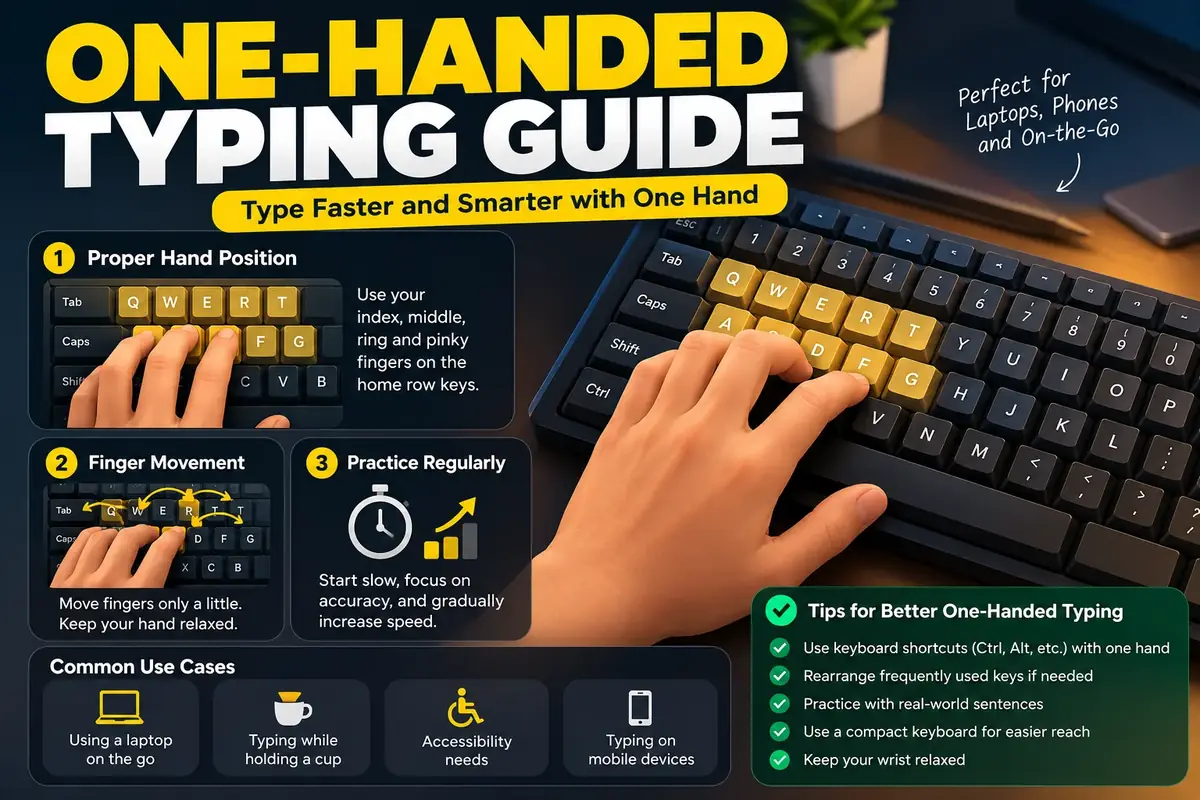
Most of the digital world is designed around the assumption of two functioning hands typing in parallel. When that assumption breaks, conventional hunt-and-peck typing with one finger is exhausting, slow, and physically straining.
Fortunately, assistive technology and biomechanics offer proven, systematic paths to regaining rapid, fluid, and comfortable typing with a single hand.
Who benefits from one-handed typing?
One-handed typing techniques serve a diverse spectrum of users:
- Stroke Survivors & Hemiplegia: Individuals relearning communication and workplace skills following neurological events.
- Upper-Limb Amputees & Congenital Differences: Lifelong single-handed typists seeking maximum ergonomic speed.
- Temporary Injuries: Writers and programmers recovering from broken wrists, carpal tunnel surgeries, or rotator cuff tears.
- Multitasking Professionals: Field technicians, medical ultrasound operators, and CAD engineers who must keep one hand on instrumentation or mouse controls while entering data.
The three core one-handed typing systems
| Approach | Setup Complexity | Learning Curve | Ideal Application |
|---|---|---|---|
| Single-Hand QWERTY (Radial Stretch) | Zero setup — works on any standard keyboard immediately | Moderate (1 to 2 weeks for 20 WPM) | Temporary injury, cast or sprain, occasional one-handed typing |
| Half-QWERTY (Mirror Spacebar) | Lightweight software script or hardware keyboard | Very fast (few days, transfers existing QWERTY memory) | Former two-handed typists adapting to permanent single-hand use |
| Dvorak One-Handed (Left or Right) | Built natively into Windows, macOS, and Linux OS settings | Steep (4 to 8 weeks to rewire motor reflexes) | Long-term professional speed, transcribers, data entry |
Half-QWERTY: The mirror-image muscle memory shortcut
Pioneered by researcher Edgar Matias, Half-QWERTY is widely considered the fastest way for former two-handed typists to adapt to single-hand typing.
How It Works: You place your single hand on its standard home row (e.g., your left hand on A-S-D-F). When you type normally, it outputs those keys. But when you hold down the Spacebar (acting as a modifier), your fingers mirror the opposite hand's keys:
A+ Spacebar becomes;S+ Spacebar becomesLD+ Spacebar becomesKF+ Spacebar becomesJG+ Spacebar becomesH
Because the human motor cortex possesses symmetrical motor memory, your brain already knows which finger is responsible for which opposite key. Most adults achieve 30+ WPM within just 3 to 5 days of practice using free software emulators (like AutoHotkey scripts) or dedicated Half-QWERTY keyboards.
Dvorak Left-Hand & Right-Hand layouts
If you are starting fresh or want the absolute highest ergonomic efficiency with zero modifier keys, consider the Dvorak One-Handed Layouts.
Created by Dr. August Dvorak, these layouts cluster the most common vowels and consonants directly in the central home zone of the keyboard:
- Dvorak Left Hand: High-frequency keys (E, T, A, O, I, N, S) are placed directly under the left index, middle, and ring fingers. Reaches are minimized to just one column.
- Dvorak Right Hand: Mirrors the layout for the right hand.
- Zero Cost: Both layouts are pre-installed in Windows, macOS, iOS, Android, and Linux. You can enable them in your language and keyboard settings with one click.
Physical keyboard positioning & desk angle
Typing with one hand on a flat, horizontal keyboard forces severe ulnar wrist deviation as you reach across to the far side of the board.
Follow these critical physical setup rules:
- Rotate the Keyboard: Angle the keyboard at 30° to 45° on your desk. If typing with your left hand, rotate the right side of the keyboard away from you. If typing with your right hand, rotate the left side away.
- Center the Hand: Do not center the whole keyboard in front of your chest. Align your functional hand and forearm directly with your shoulder line.
- Compact Form Factors: Use a tenkeyless (TKL) or 60% compact keyboard to bring the mouse or trackball closer to your hand, eliminating excessive reaching.
Essential OS accessibility tweaks
To eliminate physical friction, activate these built-in operating system accessibility features immediately:
- Sticky Keys: Pressing
Shift,Ctrl, orAltlocks the modifier until you strike the next character, allowing one-finger capitalization and shortcuts without awkward acrobatics. - Filter Keys / Bounce Keys: Ignores brief, unintended double keypresses caused by tremors or motor spasms.
- Foot Pedals: Inexpensive USB foot switches can be mapped to
Shift,Enter, orBackspace, offloading modifiers to your feet.
Once your setup is configured, test your progress on our typing tests and track your consistency over time.
FAQ
Can someone type fast with only one hand?
Yes. Proficient one-handed typists routinely achieve 40 to 60+ Net WPM on sustained prose. Many court reporters, programmers, and administrative professionals with hemiplegia or limb loss type fast enough that typing never bottlenecks their daily career productivity.
What is the Half-QWERTY mirror typing method?
Half-QWERTY relies on a clever neurological phenomenon: bilaterally symmetric muscle memory. When you hold down the Spacebar, your hand types the 'mirror image' of the other half of the keyboard. For example, your left fingers on A-S-D-F instantly type semicolon-L-K-J. It allows experienced QWERTY typists to regain 70% of their speed within a single week.
Is the Left-Hand or Right-Hand Dvorak layout better?
Both are engineered identically, placing high-frequency characters in the center cluster directly beneath your strongest fingers. Choose whichever hand is your functional or dominant hand. Both layouts are free and natively pre-installed in Windows, macOS, and Linux keyboards.
How do I type capital letters and shortcuts with one hand?
Enable 'Sticky Keys' in your operating system accessibility menu. This allows you to press Shift, Ctrl, or Alt, release it, and then press your target letter without contorting your fingers to hold both simultaneously.
Sources & references
- Matias, E., MacKenzie, I. S., & Buxton, W. — Half-QWERTY: Typing With One Hand Using Your Two-Handed Skills (CHI Conference)
- American Occupational Therapy Association (AOTA) — Assistive Technology Interventions for Upper-Extremity Impairments
- Dvorak One-Handed Layout Documentation — Ergonomic Bigram Efficiency in Unilateral Typing
Last updated 2026-09-26.