
Number Row Typing Practice: 1–0
Master the top numeric row without looking down, using two-row anchor vectors and index-finger discipline.
Anchor discipline
The number row is twice as far from your home position as the top letter row. To type numbers blind, you must never lift your entire hand into the air. Keep your inactive fingers resting lightly on the home row to preserve your physical compass.
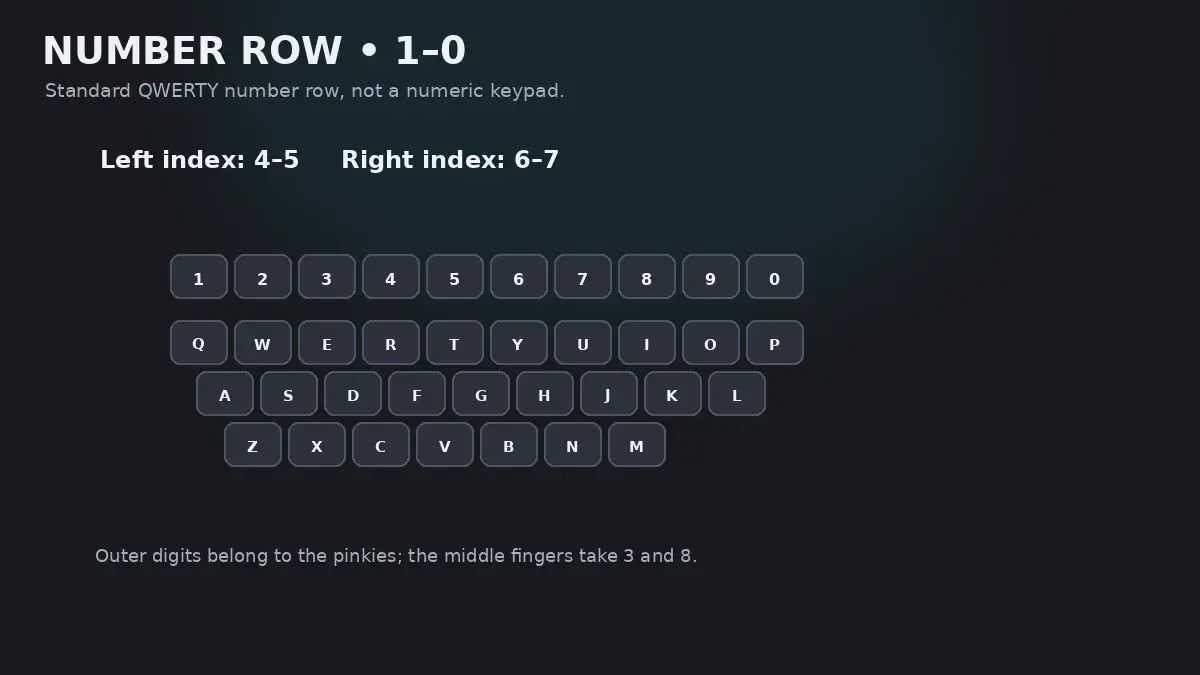
The Two-Row Reach Problem
Even people who type letters fluently at 80 WPM frequently drop to a complete halt whenever a number appears in their text. Their hands hover, their eyes dart down to the keyboard, they peck the number with one index finger, and then their eyes dart back up to find their place on the screen.
This hesitation happens because the top number row requires a two-row vertical reach. When reaching for 3, your middle finger must travel all the way past E to find the key. If your entire hand drifts forward during that reach, you lose tactile contact with the home row, and your fingers become hopelessly lost.
The solution is simple: keep at least one finger anchored on the home row (especially your index fingers on F and J) whenever extending for any number.
Complete Number Row Finger Map (1–0)
Every number key has a strict finger assignment that mirrors the letter row below it:
| Finger | Home → Number | Travel Vector | Anchor & Stability Tip |
|---|---|---|---|
| Left Pinky | A → 1 | Up-left long diagonal reach past Q | Extend pinky while keeping remaining fingers hovering lightly above S-D-F. |
| Left Ring | S → 2 | Up-left direct diagonal past W | Maintain left index anchor on F to preserve spatial awareness. |
| Left Middle | D → 3 | Upward extension past E | Extremely stable reach due to middle finger length. Return immediately to D. |
| Left Index | F (Anchor) → 4 and 5 | 4: Up-left past R; 5: Up-right stretch past T | Left index owns both 4 and 5. Return immediately to the F tactile bump. |
| Right Index | J (Anchor) → 6 and 7 | 6: Up-left stretch past Y; 7: Up-left reach past U | Right index owns both 6 and 7. The reach to 6 is the single longest index reach on the keyboard. |
| Right Middle | K → 8 | Upward extension past I | Straight upward trajectory. Index stays anchored on J. |
| Right Ring | L → 9 | Up-left diagonal reach past O | Keep palm level to prevent twisting the wrist outward. |
| Right Pinky | ; → 0 | Up-left long diagonal reach past P | Controls 0, minus (-), and equals (=). Return right hand to home position after striking. |
Splitting 5 and 6 Correctly
The most common point of confusion on the number row is the center boundary between 5 and 6.
- Left Index Finger: Controls
4and5. When reaching for5, extend upward and slightly right fromF. - Right Index Finger: Controls
6and7. When reaching for6, extend upward and significantly left fromJ.
Because the 6 key requires a long stretch to the left, many typists mistakenly strike it with their left hand. This creates severe finger collisions when typing common combinations like 56 or 65. Practice the reach from J to 6 until your right index finger executes the diagonal stretch automatically.
Dates, Phone Numbers & Practical Drills
Abstract number repetition like 12345 67890 builds basic geometry, but real-world fluency requires typing numbers embedded in realistic contexts:
Drill 1: Left-Hand Numbers (1, 2, 3, 4, 5)
a1a s2s d3d f4f f5f 12 23 34 45 54 43 32 21 142 531 245 135
Drill 2: Right-Hand Numbers (6, 7, 8, 9, 0)
j6j j7j k8k l9l ;0; 67 78 89 90 09 98 87 76 680 790 869 078
Drill 3: Calendar Dates & Years
1984 1999 2001 2012 2024 2026 1776 1492 1066 1865 1945 2030
Drill 4: Phone Numbers & Alphanumeric Mix
room 402 flight 718 gate 14 route 66 zip 90210 code 505 order 8821
Interactive HeroTyping Lessons
Ready to test your number-row accuracy? HeroTyping provides dedicated lessons designed to build this exact skill:
- Lesson 13: Numbers Low (1, 2, 3, 4, 5)
- Lesson 14: Numbers High (6, 7, 8, 9, 0)
- Lesson 20: Numbers and Words Integrated
FAQ
Why do I always look down at the keyboard when typing numbers?
Because the number row is two full rows above your resting home position (separated by the entire QWERTY row). Moving fingers across two vertical rows without an anchor finger causes typists to lose their spatial coordinates, prompting an instinctive urge to glance down. Maintaining at least one finger anchored on the home row solves this immediately.
Which hand and finger types the number 6?
In standard touch typing, the number 6 belongs exclusively to the right index finger, reaching up and left from 'J'. Although 6 sits near the physical center of the keyboard, giving it to the right index finger balances finger load against the left index finger (which controls 4 and 5).
Should I use the top number row or the dedicated numeric keypad (Numpad)?
Use the top number row whenever typing mixed alphanumeric content: passwords, dates, postal codes, street addresses, and coding syntax. Use the ten-key Numpad only for pure, continuous accounting data entry (spreadsheets, invoice batches) where your left hand doesn't need to type letters.
How long does it take to learn the number row blind?
With 10 minutes of focused anchor practice per day, most typists eliminate looking down for numbers within 7 to 10 days. Reaching full speed parity with your letter typing typically takes 3 to 4 weeks.
Sources & references
- Spatial Disorientation and Error Recovery in Long-Distance Keystrokes — Salthouse, T. A. (Cognitive Science, 1984)
- Comparative Biomechanics of Numeric Entry: Top-Row vs. Keypad Configurations — Peper, E., et al. (Applied Ergonomics, 2003)
- Motor Chunking and Spatial Coding in Numeric Keystroke Sequences — Verwey, W. B. (Psychological Research, 1999)