
How to Type Numbers and Symbols Without Looking at the Keyboard
The anchor-finger technique, diagonal reach vectors, and the opposite-hand Shift rule to conquer the top number row forever.
The Anchor Finger Rule
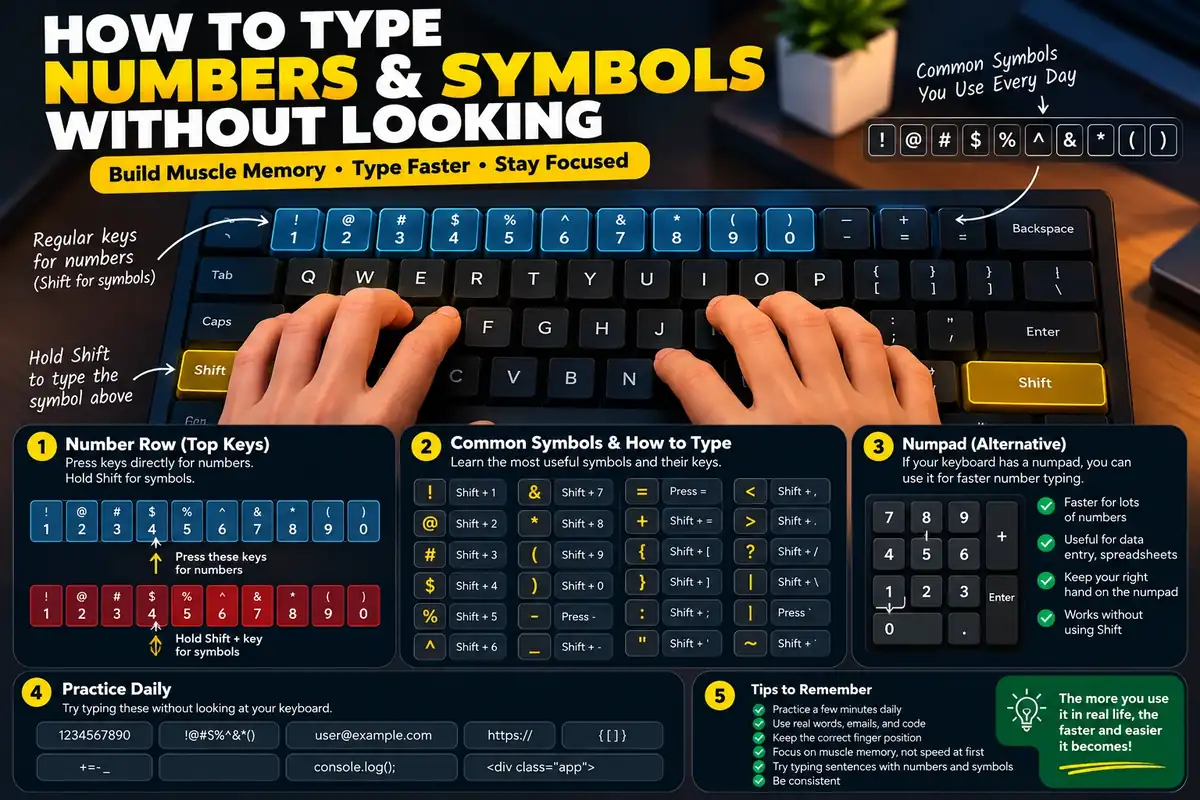
The #1 mistake people make when reaching for numbers is lifting their entire hand off the keyboard. Once both hands leave the home row, your spatial coordinates vanish, and you are forced to glance down. Keep at least one finger—ideally your index or middle finger—lightly anchored to its home-row bump (F or J) whenever reaching upward.
Top-row reach vectors
You can type 80 WPM with your eyes closed on standard prose. But the moment a complex password, street address, currency figure, or programming block appears:
...your hands freeze, your rhythm shatters, and your head drops down to hunt for the &, %, or # symbols.
Conquering the top number row is the final frontier that separates intermediate typists from true keyboard masters. Here is the step-by-step biomechanical roadmap to complete top-row independence.
Why 85% of touch typists still peek at numbers
Keystroke tracking studies show that while over 70% of frequent computer users can touch-type the alphabet without looking, fewer than 15% can reliably type top-row symbols blindly.
Three specific biomechanical factors explain this disconnect:
- Double-Row Distance: Reaching from the home row (
A-S-D-F) to the number row (1-2-3-4-5) requires your finger to cross the entireQ-W-E-R-Trow. This double jump feels imprecise without tactile feedback. - Low Relative Frequency: In standard English text, numbers and special symbols comprise only 2% to 4% of all characters. Muscle memory decays quickly without daily reinforcement.
- Shift Dual-Key Timing: Typing a symbol (e.g.
$) requires coordinating two separate fingers on opposite hands at the exact microsecond.
The core anchor finger principle
Your keyboard comes equipped with built-in navigation beacons: the raised tactile bumps on the F and J keys.
When reaching for any number or symbol:
- Never launch both hands into the air: Keep your non-reaching hand firmly poised above its home row.
- Maintain a physical pivot: When your left ring finger reaches up for
2, keep your left index finger touchingF. That physical anchor provides your nervous system with an unshakeable point of reference. - Springback recoil: The moment the number key actuates, immediately snap your finger back to the home row like a spring-loaded recoil. Never let fingers loiter on the top row.
Number row finger reach guide
| Finger | Assigned Keys | Anchor Position | Reach Biomechanics |
|---|---|---|---|
| Left Pinky | 1 and ! (Exclamation) | Left hand anchors gently on S-D-F | Reach diagonally up and left from the resting 'A' key. Never drift your wrist left. |
| Left Ring | 2 and @ (At-symbol) | Index finger stays anchored on F | Extend straight up past 'W'. Keep the wrist level; only extend the ring finger joint. |
| Left Middle | 3 and # (Hash / Pound) | Index finger stays anchored on F | Extend up past 'E'. This is one of the most stable reaches due to middle finger strength. |
| Left Index | 4 / $ (Dollar) and 5 / % (Percent) | Middle & ring rest on D & S | Reach up-left for 4 and up-right for 5. Return immediately to the F home bump. |
| Right Index | 6 / ^ (Caret) and 7 / & (Ampersand) | Middle & ring rest on K & L | Reach up-left for 6 and straight up-left for 7. The 6-key reach is the longest index stretch. |
| Right Middle | 8 and * (Asterisk) | Index stays anchored on J | Extend straight up past 'I'. Stable and intuitive vertical trajectory. |
| Right Ring | 9 and ( (Open Parenthesis) | Index stays anchored on J | Extend up past 'O'. Keep palm floating above desk to avoid twisting wrist. |
| Right Pinky | 0 / ), - / _ (Dash), = / + (Equals) | Index stays anchored on J | Controls the upper-right corner. Use Left Shift for all associated symbols. |
The opposite-hand Shift rule
Attempting to hold the Left Shift key with your left pinky while stretching your left index or middle finger to hit $ (Shift+4) or % (Shift+5) forces an extreme, injurious claw grip known as lateral carpal strain.
The Golden Law of Shift:
- If the number/symbol is on the Left Hand (1, 2, 3, 4, 5 / !, @, #, $, %): Always hold the Right Shift key with your right pinky.
- If the number/symbol is on the Right Hand (6, 7, 8, 9, 0 / ^, &, *, (, )): Always hold the Left Shift key with your left pinky.
By splitting the modifier and the keystroke across opposite hands, each hand maintains full natural dexterity without awkward hand twisting.
10-day blind number mastery curriculum
Dedicate 10 minutes each morning to these targeted drills:
- Day 1–2 (Index Anchors 4, 5, 6, 7): Drill reaches from F and J home keys:
f4f f5f j7j j6j 45 67 47 56. - Day 3–4 (Middle & Ring 2, 3, 8, 9): Drill vertical reaches:
d3d s2s k8k l9l 2389 3829. - Day 5–6 (Pinky Corners 1, 0, -, =): Master outer bounds:
a1a ;0; ;- ;= 10 - = 100 1000. - Day 7–8 (Opposite Shift Symbols): Drill high-frequency symbols:
! @ # $ % ^ & * ( ). Enforce the opposite-hand Shift rule rigorously. - Day 9–10 (Real-World Alphanumeric Strings): Practice mixed strings, currency, and dates on our custom practice mode and verify your numbers on our KPH calculator.
FAQ
Why is the top number row so much harder to blind-type than letter rows?
Because the number row is two full rows away from your resting home row (separated by the QWERTY top letter row). Moving fingers across two vertical rows without an anchor causes typists to lose their spatial coordinates, prompting the instinctive urge to look down.
Should I use the top number row or the dedicated numeric keypad (Numpad)?
Use the top number row for mixed alphanumeric text (passwords, addresses, programming syntax, dates). Use the ten-key Numpad only for pure, continuous accounting data entry (spreadsheets, invoice batches) where your left hand doesn't need to type letters.
What is the 'Opposite-Hand Shift Rule' for symbols?
Always hold the Shift key with the opposite hand from the finger striking the symbol. For example, when typing exclamation '!' (left pinky), hold the Right Shift key with your right pinky. Using the same hand to hold Shift and reach for a top-row key causes severe wrist contortion and misses.
How long does it take to type numbers without looking?
With 10 minutes of focused daily anchor practice, most typists eliminate looking down for numbers within 7 to 10 days. Reaching full speed parity with your letter typing typically takes 3 to 4 weeks.
Sources & references
- Aalto University Keystroke Telemetry — Latency Penalties Associated with Top-Row Number Transition
- Touch Typing Pedagogy Research — Kinesthetic Anchoring in Number and Symbol Key Reach
- Ergonomics in Computing — Bilateral Shift Coordination in Alphanumeric Data Entry
Last updated 2026-09-26.