
How to Improve Typing Accuracy
A repeatable system for fixing mistakes at the source, not just typing more and hoping.
Quick answer
Typing accuracy improves fastest by finding your specific, repeated error patterns — not your overall percentage — and drilling those directly at a deliberately slower pace. Speed pressure is the single biggest cause of avoidable mistakes; removing it for a few sessions usually raises accuracy faster than any other single change.
Accuracy drops for identifiable reasons, not randomly — and once you know which one is actually happening, the fix is usually specific and fast rather than vague and slow.
Why accuracy drops
| Cause | Fix |
|---|---|
| Rushing ahead of your actual skill | Slow down deliberately for a few sessions — accuracy almost always recovers within days once speed pressure is removed. |
| Wrong finger for the key | A non-standard finger assignment is less consistent by nature. Review the finger map and correct it now rather than later, when it's more habitual. |
| Incomplete keyboard familiarity | If specific keys (numbers, punctuation, less-common letters) still require a visual search, that search itself is where errors creep in — drill those keys directly. |
| Visual searching instead of muscle memory | Errors cluster around keys you're still locating by sight rather than feel. See how to type without looking for the specific fix. |
| Broken rhythm from anxiety about mistakes | Ironically, worrying about the next mistake often causes it — a tense, hesitant approach breaks the steady rhythm that accuracy actually depends on. |
| Practicing only familiar text | If every session uses words you already type well, your error rate looks artificially low. Unfamiliar text surfaces the patterns actually worth fixing. |
The accuracy improvement system
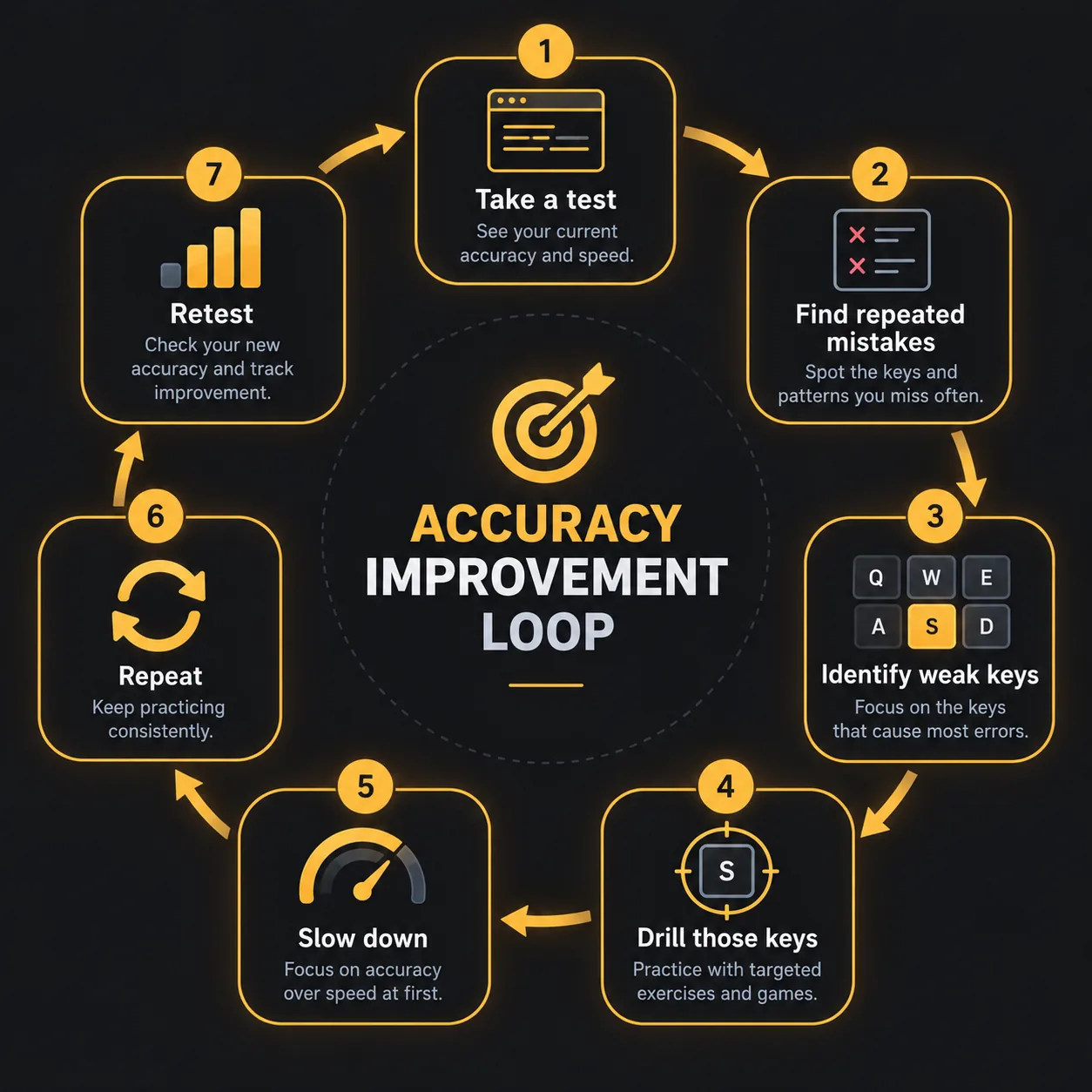
- Take a test. Run a normal test at your usual pace to establish your current accuracy honestly.
- Find repeated mistakes. A single random slip is noise. A specific letter or combination you mistype across multiple attempts is signal — that's what's actually worth fixing.
- Identify the weak keys. Narrow it down to the exact keys or combinations involved, not just “I make mistakes sometimes.”
- Drill those keys specifically. Isolated repetition on the exact pattern, rather than hoping general practice fixes it incidentally.
- Slow down. Practice the drill at a pace where you can hold close to 100% accuracy, even if it feels uncomfortably slow.
- Repeat. Run the drill across several short sessions rather than once.
- Retest. Compare accuracy on a normal test to your baseline — a genuine improvement in the specific pattern should show up as fewer overall errors.
Accuracy targets by stage
These are practical, commonly-used targets, not scientific or universal thresholds — treat them as orientation for where you might reasonably aim next, not a pass/fail line.
| Stage | Reasonable target |
|---|---|
| Beginner (still learning finger placement) | 90–95% — expect real, frequent errors while the finger map is still forming. |
| Developing | 95–97% — most home-row and common-word errors should be resolving. |
| Comfortable / everyday typist | 97–99% — occasional slips are normal even at this stage. |
| Professional / data entry | 98–99.5%+ — most employer and certification benchmarks sit in this range. |
The speed/accuracy trade-off
Pushing speed before accuracy is solid almost always backfires: every correction costs a backspace, a re-type, and a broken rhythm — more total time than typing slightly slower in the first place would have cost. The trade only makes sense in the other direction — build accuracy first, then let speed rise from a stable, low-error baseline. See how to improve your typing speed for what changes once accuracy stops being the limiting factor.
When to increase speed
Once you can hold your accuracy target comfortably at your current pace for several sessions in a row, that's the signal to nudge speed up — not before. If accuracy drops noticeably when you do, that's useful information, not failure: it tells you exactly where your current real ceiling is, so you can back off slightly and consolidate before pushing again. HeroTyping shows accuracy and consistency on every results screen specifically so this trade-off is visible instead of guessed at.
FAQ
Why is my accuracy low even though I know where the keys are?
Knowing key locations and reaching them reliably under time pressure are different skills. Accuracy issues at this stage are usually about rhythm and consistency, not knowledge — slowing down and focusing on one repeatable motion per key, rather than reviewing the layout again, is the more direct fix.
Should I fix mistakes immediately or keep typing?
For accuracy-focused practice sessions specifically, fix mistakes immediately — the goal of those sessions is training a clean motor pattern, and typing through an error reinforces the wrong one. During normal, faster-paced tests, some typists find it faster overall to finish the word and let periodic review catch what backspacing would have interrupted.
What accuracy percentage should I aim for?
There's no single universal number — 95%+ is a reasonable everyday target once you're past the beginner stage, and 98%+ is typical for professional or data-entry contexts. Treat these as practical targets, not scientific thresholds; what matters more is whether your accuracy is trending upward over time.
Does typing slower always improve accuracy?
Usually, but not automatically — slowing down removes time pressure, which is the biggest cause of avoidable errors, but it doesn't fix a genuinely wrong finger assignment or an unfamiliar key on its own. Slowing down works best combined with deliberately correct technique, not as a substitute for it.
Last updated 2026-09-24.