
Home Row Typing Practice: ASDF JKL;
The definitive guide to keyboard anchoring, tactile indexing, and finger mechanics for the home row.
Core rule
Your fingers should always return to the home row after every single keystroke across the entire keyboard. Think of the home row as your physical base camp: you venture out to strike a key on the top or bottom row, and instantly retract back to your home position.
What Is the Home Row and Why Is It Sacred?
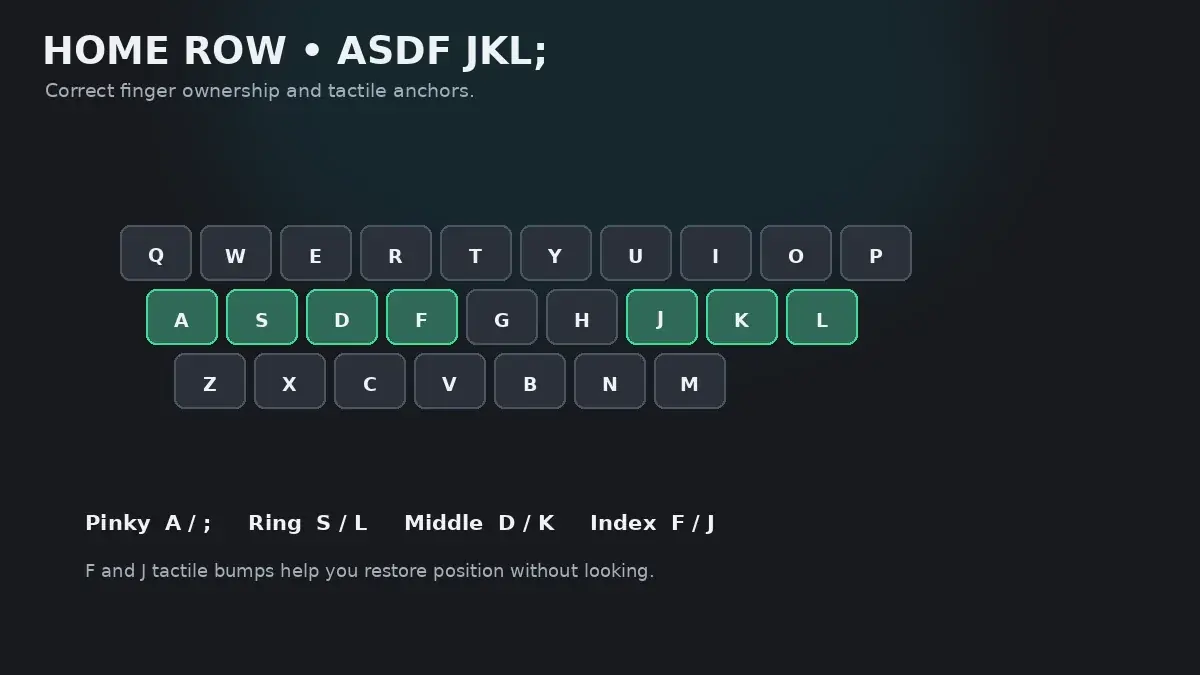
On a standard QWERTY keyboard, the home row is the central horizontal strip containing eight primary resting keys: A, S, D, F for your left hand, and J, K, L, ; for your right hand. In the center sit G and H, which are struck by reaching laterally with your index fingers.
The home row is the foundation of touch typing because it minimizes total finger travel distance. By resting your fingers on the center row, every other key on the keyboard—from the top number row to the bottom row—is never more than one or two key-widths away from a resting finger.
Exact Finger Assignments and Micro-Movements
Every finger has a designated home position. Review the anatomical breakdown below:
| Finger | Home Key | Biomechanical Movement Guide | Common Beginner Mistake |
|---|---|---|---|
| Left Pinky | A | Rests gently on key center. Striking requires light downward tap without tilting hand outward. | Flying upward when the index finger reaches for G. |
| Left Ring | S | Natural vertical flexion. Keep knuckle relaxed and curved like holding a tennis ball. | Tensing when pinky moves to A. |
| Left Middle | D | Strongest finger on left hand. Serves as secondary pivot point alongside F. | Pressing too hard and bottoming out switch with excessive force. |
| Left Index | F (Tactile Anchor) | Locates the physical ridge/nib. Controls both F and the inner lateral reach to G. | Losing contact with the nib when reaching for G. |
| Right Index | J (Tactile Anchor) | Locates the right physical nib. Controls J and reaches leftward to H. | Drifting over to H and resting there permanently. |
| Right Middle | K | Rests squarely on K. Acts as right-hand structural balance anchor. | Slipping off key during fast alternating drills. |
| Right Ring | L | Rests on L. Moves strictly up and down with minimal lateral rotation. | Extending flat instead of maintaining natural curl. |
| Right Pinky | ; (Semicolon) | Rests on Semicolon. Must stay positioned without flaring outward off the keyboard edge. | Floating into empty space to the right of the keyboard. |
Mastering the F and J Tactile Nibs
Notice the raised horizontal ridges or plastic dots molded onto the F and J keys. These are not decorative; they are your primary sensory interface with the machine.
Try this blind calibration drill right now:
- Close your eyes and lift both hands completely away from the keyboard.
- Lower your hands toward the keyboard, gently brushing your index finger pads across the center keys until you feel the raised ridges under your left and right index fingers.
- Once your index fingers touch
FandJ, let your remaining three fingers on each hand fall naturally ontoA-S-DandK-L-;. - Open your eyes. If your hands are positioned correctly without looking, you have mastered tactile homing.
Thumb Mechanics and Spacebar Rules
While eight fingers rest on the letter keys, both thumbs float lightly above the Spacebar. A frequent source of beginner confusion is deciding which thumb should strike the space:
- The Dominant Thumb Approach: Dedicate your dominant hand's thumb (right thumb for 90% of typists) exclusively to the Spacebar. The non-dominant thumb rests inactive. This simple rule eliminates hesitation.
- The Alternating Thumb Approach: Strike the Spacebar with the hand opposite to the last typed letter. For example, after typing cat (ended by left-hand
T), press Space with your right thumb. This maximizes speed by overlapping hand movements.
Step-by-Step Practice Drills
Practice these four drill sequences to build permanent home-row muscle memory:
Drill 1: Left-Hand Home Anchor
asdf asdf fdas fdas aass ddff afsd dafs fds aada
Drill 2: Right-Hand Home Anchor
jkl; jkl; ;lkj ;lkj jjkk ll;; j;kl k;lj lk;j ;llk
Drill 3: Two-Hand Alternating Coordination
aj sk dl f; a; sl dk fj asdf jkl; fdsa ;lkj alsk djfh
Drill 4: Real Home-Row English Words
ask dad sad fall glad flask salads alas达 falls达 flasks dallas
Once you feel comfortable, jump into the interactive lesson engine: start with Lesson 1: Home Row Left and progress through Lessons 2, 3, and 4 in HeroTyping Lessons.
FAQ
Why do the F and J keys have raised bumps or ridges?
The small plastic bumps or ridges on 'F' and 'J' are tactile orientation anchors designed by industrial engineers. They allow your index fingers to find the home row by touch alone, without glancing down at your hands. Whenever you sit at a desk or lose your place, feel for these ridges to instantly recalibrate your hands.
Which thumb should I use to press the Spacebar?
Most typists use the thumb of their dominant hand (right thumb for right-handed typists, left thumb for left-handed typists). However, the most efficient technique is opposite-thumb spacing: if the last letter of a word was typed by a left-hand finger, strike the Spacebar with your right thumb, and vice versa. Whichever method you choose, pick one thumb and stay consistent.
Should my fingers press down firmly on the home keys when resting?
No. Your fingers should rest with feather-light contact—just enough pressure to feel the keycaps, but far below the actuation force needed to register a keypress. Heavy resting weight strains forearm tendons and causes accidental ghost presses.
How long should I practice the home row before moving to the top row?
Stay on the home row until you can type all 8 home keys (and basic home words like 'ask', 'fall', 'sad', 'glad', 'flask') at 95%+ accuracy without looking down. For most learners, this takes 2 to 4 days of 15-minute daily practice.
Sources & references
- Tactile Perception and Haptic Anchoring in Typing Performance — Lederman, S. J., & Klatzky, R. L. (Cognitive Psychology, 1987)
- Electromyographic Analysis of Hand Tendon Strain During Home-Row Typing — Gerard, M. J., et al. (Ergonomics, 1999)
- The Development of Motor Programs for Typing — Shaffer, L. H. (Quarterly Journal of Experimental Psychology, 1978)