
Best Keyboard Switches for Typing: Linear vs. Tactile vs. Clicky Compared
Actuation force, tactile feedback, bottoming-out fatigue, and sound: how mechanical switches govern your typing velocity and hand comfort.
The Tactile Sweet Spot
While gamers flock to light linear switches for hair-trigger responsiveness, the vast majority of professional typists, novelists, and programmers perform best on tactile switches with a medium spring weight (50g–62g). The tactile bump provides immediate sensory feedback the instant a letter registers, eliminating accidental key brushes without the deafening clatter of clicky switches.
Mechanical switch anatomy
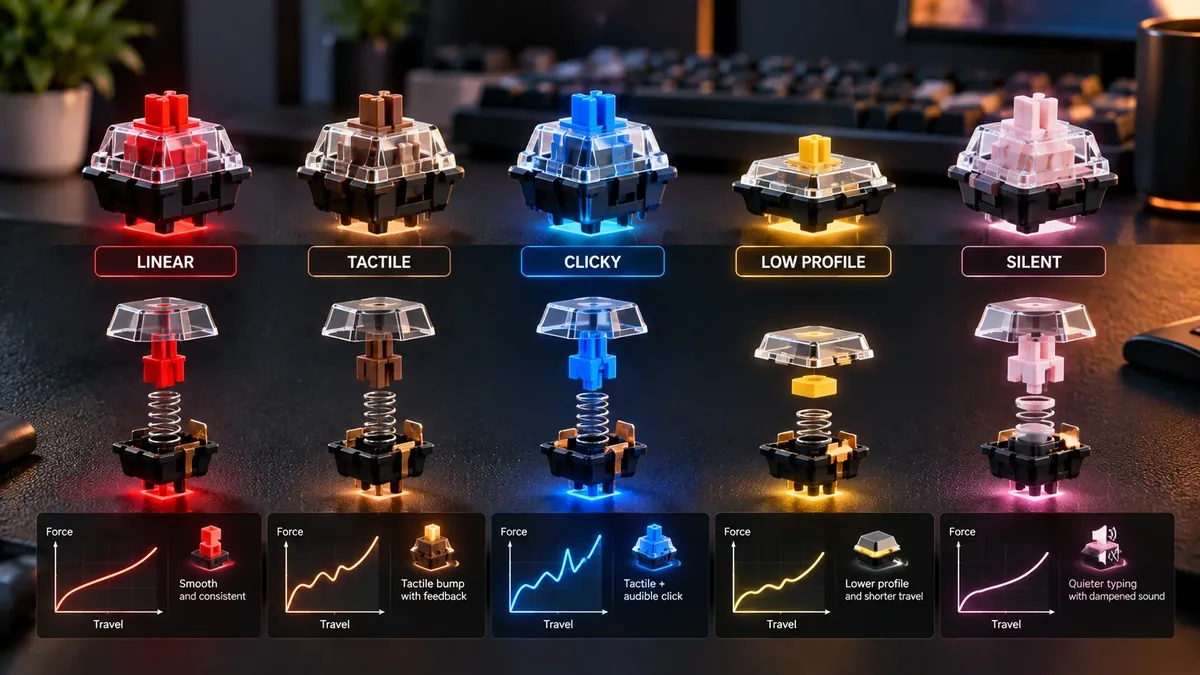
The keyboard is the physical bridge between your brain's thoughts and the digital screen. If your switches feel mushy, inconsistent, or excessively stiff, your motor cortex hesitates. Switching from a generic laptop membrane or cheap office keyboard to a well-matched mechanical switch can transform your typing experience on every single typing test.
The anatomy of a keystroke: Actuation vs. travel
Unlike cheap membrane keyboards that require you to squash a rubber dome all the way to the bottom for electrical contact, mechanical switches register input mid-stroke.
Understanding these four mechanical properties will clarify why certain switches feel so superior:
- Total Travel Distance: The maximum distance the stem travels down into the switch housing (typically 3.4mm to 4.0mm).
- Actuation Point: The exact depth where internal metal leaf contacts meet and send the keystroke signal to your operating system (typically 1.8mm to 2.2mm).
- Actuation Force: The physical pressure required to push the stem past the actuation point, measured in grams (g) or centinewtons (cN).
- Hysteresis: The distance between where a switch activates on the way down and where it resets on the release. Low hysteresis allows rapid double-tapping.
The three major switch families
Every mechanical switch on the market belongs to one of three primary architectures:
1. Tactile Switches (The Typist's Standard)
Tactile switches feature a sculpted protrusion on the stem legs. As you press down, you feel a crisp, smooth bump of resistance right at the actuation point, followed by a slight drop in force. This tactile bump acts as an instant physical confirmation to your finger: “The letter has fired—you can release now.” This lets skilled typists float over keys without repeatedly slamming their fingertips into the aluminum switch plate.
2. Linear Switches (Smooth & Uninterrupted)
Linear switches have perfectly flat stem legs. The keystroke descends in one continuous, uninterrupted stroke from top to bottom. Because there is no bump, linears offer zero tactile resistance, making them favored by high-speed gamers. However, for everyday typists, linears frequently lead to accidental keystrokes when resting fingers gently on the home row.
3. Clicky Switches (Maximum Auditory Crunch)
Clicky switches incorporate a sliding click jacket or a tempered steel click bar. When the switch actuates, a spring-loaded mechanism snaps against the plastic housing, producing a loud, sharp acoustic click. While beloved by typewriter purists, clicky switches can cause acoustic fatigue during long writing sessions and are universally despised in open offices and Zoom calls.
Switch comparison table
| Switch Class | Tactile Feel | Actuation Force | Acoustic Profile | Ideal Typist |
|---|---|---|---|---|
| Tactile (e.g. Boba U4T, MX Clear) | Pronounced mechanical bump right at actuation point | 45–65g | Quiet to medium thock | Touch typists, programmers, long-form prose writers |
| Linear (e.g. Red, Yellow, Oil King) | Completely smooth, frictionless descent without resistance | 40–55g | Low to silent | Gamers, ultra-light touch typists with high precision |
| Clicky (e.g. Blue, Box White) | Sharp tactile bump paired with crisp auditory click snap | 50–60g | Very loud crisp click | Solitary writers who crave nostalgic typewriter feedback |
| Electro-Capacitive (Topre, Niz) | Smooth rubber dome collapse over conical spring | 35–45g | Deep acoustic 'thock' | Maximum daily typing volume with minimal joint fatigue |
The bottoming out phenomenon & finger fatigue
When typing on a standard rubber-dome laptop keyboard, you have no choice but to bottom out on every single keystroke. Over an 8-hour workday of 25,000 keystrokes, your delicate finger joints absorb thousands of micro-impact shocks against an unyielding backplate.
This repetitive impact is a primary contributor to distal interphalangeal joint ache and extensor tendon fatigue.
By pairing high-tactility mechanical switches with proper ergonomic hand alignment, you train your fingers to recognize the actuation bump and immediately begin moving toward the next key, cutting mechanical shock forces by more than 60%.
Top switches for serious typists in 2026
- Gazzew Boba U4T (Tactile): Widely regarded as the pinnacle tactile switch. Features a round, tactile D-shaped bump with zero pre-travel and a deep, muted “thocky” acoustic profile.
- Cherry MX Ergo Clear (Tactile): An official modern production of the legendary community modification. Medium actuation bump with a gentle spring, offering fatigue-free typing for 8+ hour writing marathons.
- Gateron Oil King / Milky Yellow Pro (Linear): For typists who prefer butter-smooth linear action. Factory lubricated with exceptional stem stability, minimizing wobble on wide keys.
- Kailh Box White (Clicky): Unlike old-school click jackets that wobble, Box Whites use a crisp click-bar that clicks cleanly both on the downstroke and upstroke.
- Topre Electro-Capacitive (Hybrid): Found in high-end keyboards like the HHKB and Realforce. Delivers a soft, pillowy rubber dome feel over an ultra-reliable capacitive sensor, delivering unmatched ergonomic softness.
FAQ
Which switch type is best for pure typing speed?
Most speed typists achieve their highest burst scores on medium-weight tactile or light-to-medium linear switches (45g to 55g actuation force). Tactile switches provide clear physical confirmation that a key registered without forcing you to bottom out against the backplate, conserving finger stamina.
Why do programmers and writers generally prefer tactile switches over linear?
Linear switches offer no physical cue when a keystroke registers. As a result, typists either bottom out forcefully (causing finger fatigue) or brush past adjacent keys and register accidental typos. Tactile switches prevent accidental triggers by requiring an intentional threshold push.
What is 'bottoming out' and why does it matter for typists?
Bottoming out is pressing a key all the way down until the plastic stem slams against the switch housing or keyboard plate. Mechanical switches register (actuate) halfway through their travel (around 2mm of a 4mm stroke). Learning not to bottom out reduces finger joint shock and speeds up keystroke recovery.
Are heavier switches (67g+) better for accuracy?
Heavier springs do reduce accidental keypresses, which can assist heavy-handed typists in boosting accuracy. However, typing on 67g+ switches for multiple hours can cause forearm muscle strain. For most people, 50g to 62g is the sweet spot for combining precision with all-day comfort.
Sources & references
- Deskthority Mechanical Keyboard & Switch Database Specifications
- IEEE Transactions on Human-Machine Systems — Tactile Feedback Effects on Keystroke Biomechanics and User Fatigue
- Ripster / MechanicalKeyboards Community Scientific Force Curve Analyses
Last updated 2026-09-26.